Grammarly Premium vs. ProWritingAid: A Comprehensive Comparison of Top Grammar Checking Tools
Choosing the right grammar and writing assistant can dramatically improve the quality, clarity, and effectiveness of your writing. In Grammarly Premium vs. ProWritingAid: A Comprehensive Comparison of Top Grammar Checking Tools, we take an in-depth look at two of the most popular AI-powered writing tools to help you decide which one best fits your needs.
Osita
1/26/202612 min read
Grammarly Premium vs. ProWritingAid: A Comprehensive Comparison of Top Grammar Checking Tools
Choosing the right grammar checker can significantly impact writing quality and productivity. Both Grammarly Premium and ProWritingAid offer robust features, but they serve different types of writers with distinct needs and preferences.
Grammarly Premium excels at providing quick, intuitive corrections for everyday writing, while ProWritingAid offers deeper analysis and comprehensive reports better suited for long-form content and creative writers. The decision between these tools depends on factors like writing style, budget constraints, and the level of detail required in feedback.
Understanding how these platforms compare across grammar accuracy, advanced features, customization options, pricing structures, and integration capabilities helps writers select the tool that aligns with their specific requirements. Each platform brings unique strengths to different writing scenarios.
Overview of Grammarly Premium and ProWritingAid
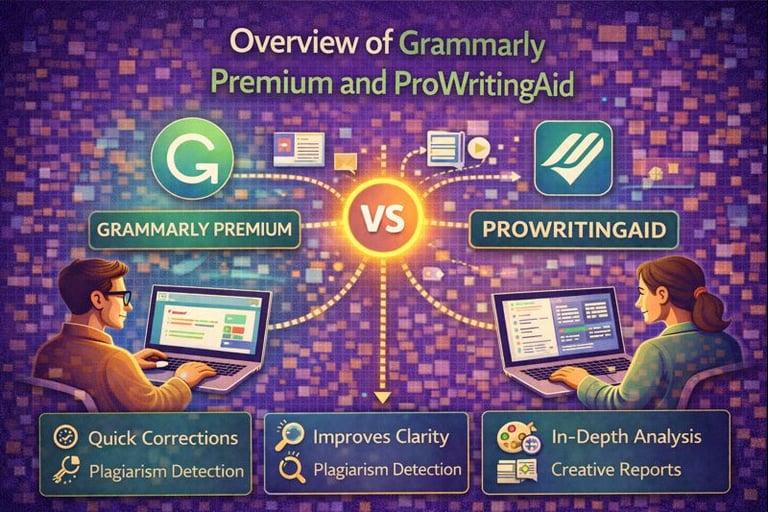
Grammarly Premium and ProWritingAid are AI-powered writing assistants that check grammar, spelling, punctuation, and style. They target different writer types with distinct feature sets and pricing models.
History and Core Features
Grammarly launched in 2009 as a grammar checking tool and evolved into a comprehensive writing assistant. The platform uses AI to identify grammar errors, spelling mistakes, punctuation issues, and style inconsistencies. Grammarly Premium adds advanced features including tone detection, clarity improvements, word choice suggestions, and plagiarism detection.
ProWritingAid entered the market in 2012 with a focus on in-depth writing analysis. The tool provides over 20 different writing reports that examine grammar, style, readability, and structure. ProWritingAid emphasizes comprehensive editing with detailed explanations for suggestions.
Both tools offer real-time corrections and suggestions. Grammarly focuses on a streamlined, user-friendly experience with quick fixes. ProWritingAid delivers more detailed feedback with contextual information about writing rules and principles.
Supported Platforms and Integrations
Grammarly Premium works across multiple platforms through browser extensions for Chrome, Firefox, Safari, and Edge. The tool integrates with Microsoft Word, Google Docs, and offers desktop applications for Windows and Mac. Mobile keyboards for iOS and Android provide on-the-go corrections.
ProWritingAid supports similar platforms with browser extensions and desktop applications. The tool integrates directly with Scrivener, Microsoft Word, Google Docs, and Final Draft. ProWritingAid offers plugins for popular writing applications like Atticus and Vellum.
ProWritingAid provides more integrations with creative writing software compared to Grammarly. Writers using specialized tools like Scrivener benefit from native ProWritingAid integration. Grammarly maintains broader general-purpose platform support for everyday writing needs.
Target Audience and Use Cases
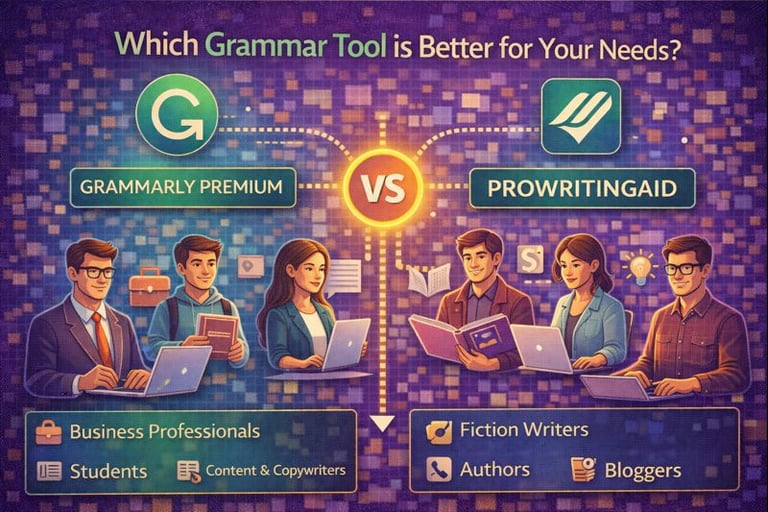
Grammarly Premium serves students, professionals, and content creators who need quick, accurate grammar checking. The tool excels at business writing, emails, reports, and academic papers. Users who prioritize ease of use and fast corrections prefer Grammarly's approach.
ProWritingAid targets fiction writers, novelists, and authors working on long-form content. The detailed reports help writers understand their writing patterns and improve specific aspects like pacing and dialogue. Bloggers and non-fiction authors also benefit from the comprehensive style analysis.
Business professionals choose Grammarly for daily communication and document preparation. Creative writers select ProWritingAid for manuscript editing and in-depth writing improvement. Both tools accommodate various skill levels from beginners to experienced writers.
Grammar and Spelling Accuracy
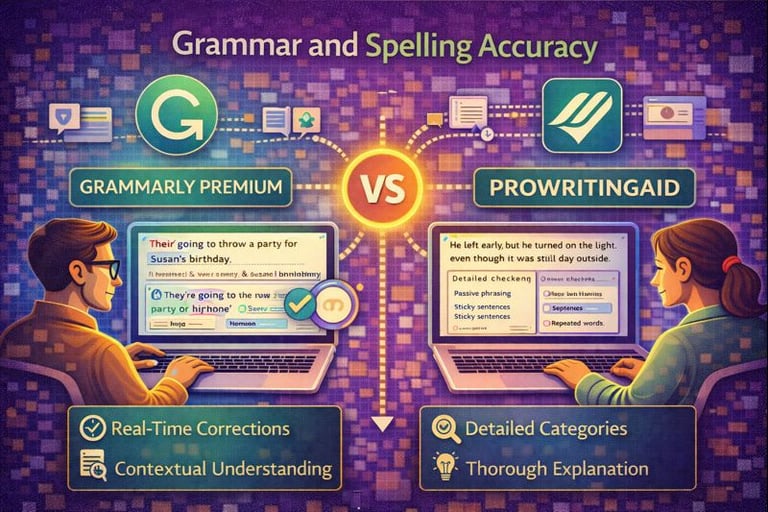
Both Grammarly Premium and ProWritingAid excel at catching basic errors, but they differ in their detection methods and the depth of corrections they offer. Grammarly tends to focus on real-time fixes with immediate suggestions, while ProWritingAid provides more detailed explanations for each error.
Error Detection Capabilities
Grammarly Premium catches approximately 95% of grammar errors in testing scenarios, including subject-verb agreement issues, incorrect verb tenses, and misplaced modifiers. The tool identifies spelling mistakes instantly and flags homophones like "their" and "there" with high accuracy.
ProWritingAid detects around 90-92% of grammar errors but offers more granular categories. It separates errors into specific types like sticky sentences, repeated words, and passive voice overuse. The tool catches most spelling errors but occasionally misses context-specific mistakes that Grammarly identifies.
Both platforms handle punctuation well, though Grammarly shows slightly better performance with comma placement and apostrophe usage. ProWritingAid sometimes suggests comma changes that are stylistic rather than grammatical errors.
Contextual Understanding
Grammarly Premium uses advanced AI to understand sentence context and meaning. It recognizes when words are used correctly in specific contexts, such as technical terms or industry jargon. The tool adjusts suggestions based on the document type and intended audience.
ProWritingAid's contextual analysis focuses more on writing style than pure context. It examines how sentences connect and flow together rather than individual word meanings. The tool sometimes flags correct usage as errors when specialized terminology appears.
Grammarly handles tone detection better, identifying when formal language shifts to casual mid-document. ProWritingAid requires users to set the writing style manually before analysis begins.
Writing Style Recommendations
Grammarly Premium provides conciseness suggestions that eliminate wordiness and redundant phrases. It offers vocabulary enhancements with synonym suggestions and identifies overused words automatically. The clarity recommendations help writers simplify complex sentences.
ProWritingAid delivers comprehensive style reports covering readability scores, sentence length variation, and transition usage. It flags clichés, vague words, and abstract language more aggressively than Grammarly. The tool provides detailed statistics on sentence structure patterns and word choice diversity.
ProWritingAid's style suggestions are more educational, explaining why changes improve writing. Grammarly focuses on quick fixes without extensive explanations. Writers seeking to improve their skills benefit from ProWritingAid's detailed feedback, while those wanting fast corrections prefer Grammarly's streamlined approach.
Advanced Writing Features
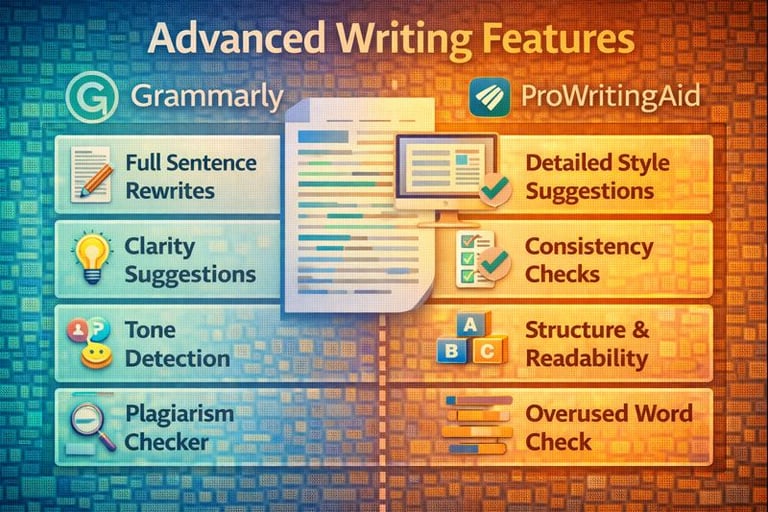
Both tools offer plagiarism checkers and vocabulary enhancement, but Grammarly emphasizes real-time clarity suggestions while ProWritingAid provides more extensive style and readability reports.
Plagiarism Detection
Grammarly Premium includes plagiarism detection that scans text against over 16 billion web pages and academic databases. The tool highlights potentially plagiarized content and provides source links for proper attribution. Users can check unlimited documents with their Premium subscription.
ProWritingAid also offers plagiarism checking, but it operates on a credit-based system even for Premium users. Each plagiarism report consumes credits, with 50 checks included in Premium plans and 100 checks in Premium Pro plans. The tool scans against published works, websites, and academic papers to identify matching content.
Writers who need frequent plagiarism checks may find Grammarly's unlimited scanning more practical. ProWritingAid's credit system requires users to monitor their remaining checks or purchase additional credits.
Vocabulary Enhancement Tools
Grammarly provides vocabulary suggestions that replace overused or weak words with stronger alternatives. The tool considers context and tone to recommend appropriate word choices. Premium users receive more sophisticated suggestions tailored to their writing goals and audience.
ProWritingAid offers a thesaurus feature alongside contextual vocabulary suggestions. The tool identifies repeated words, vague language, and clichés throughout the document. Writers can access word explorer features that show alternatives with usage examples and nuance explanations.
ProWritingAid's approach focuses on teaching writers to improve their word choice independently. Grammarly prioritizes quick, context-aware replacements that maintain the intended meaning.
Clarity and Readability Analysis
Grammarly analyzes sentence structure and suggests revisions to improve clarity. The tool identifies passive voice, complex sentences, and unclear phrasing. Premium users receive detailed explanations about why certain constructions may confuse readers.
ProWritingAid generates comprehensive readability reports using multiple metrics including Flesch Reading Ease and grade-level scores. The tool provides sentence length variation analysis, transition word usage, and pacing indicators. Writers can view visual graphs showing readability patterns throughout their document.
Grammarly delivers clarity suggestions in real-time as users write. ProWritingAid requires users to run specific reports but offers more detailed analysis for writers who want deeper insights into their writing patterns.
Customization and User Experience
Grammarly Premium prioritizes simplicity with limited customization, while ProWritingAid offers extensive settings for writers who want granular control over their editing experience.
Customization Options
ProWritingAid provides detailed customization through its settings panel. Users can adjust style preferences, set writing goals by document type, and modify suggestions for passive voice, sentence length, and readability targets. The tool allows writers to create custom style guides and add personal dictionaries.
Grammarly Premium offers fewer customization options but focuses on essential settings. Users can select between American, British, Canadian, and Australian English. The tool allows adjustments for formality level, domain-specific writing, and tone preferences. Goals can be set for audience, intent, and writing style, though these options are less granular than ProWritingAid's offerings.
Writers who need specific style requirements benefit from ProWritingAid's flexibility. Grammarly's streamlined approach works better for users who prefer quick setup without extensive configuration.
User Interface and Ease of Use
Grammarly Premium features a clean, intuitive interface that requires minimal learning time. Suggestions appear in a sidebar with clear explanations. The tool integrates smoothly across browsers, desktop apps, and mobile devices with consistent functionality.
ProWritingAid presents a more complex interface with multiple reports and detailed analysis options. New users face a steeper learning curve due to the variety of tools and reports available. The interface can feel cluttered when multiple reports are open simultaneously.
Grammarly's real-time suggestions work faster and feel less intrusive during the writing process. ProWritingAid requires users to pause and review detailed reports, which suits the editing phase better than active drafting.
Report Generation
ProWritingAid generates over 25 specialized reports covering grammar, style, readability, overused words, clichés, and sentence structure. Each report provides specific data and recommendations. Writers can run individual reports or view a comprehensive summary report that highlights key issues across categories.
Grammarly Premium consolidates feedback into a single performance score with writing statistics. The tool displays overall accuracy, clarity, engagement, and delivery scores. Weekly progress reports track improvement over time but lack the depth of ProWritingAid's individual report breakdowns.
ProWritingAid's reports appeal to writers who want detailed analysis and prefer systematic editing. Grammarly's streamlined reporting suits users who need quick feedback without extensive data review.
Pricing and Subscription Plans
Both tools offer flexible pricing structures, but ProWritingAid provides a lifetime license option while Grammarly focuses on recurring subscriptions. The free versions differ significantly in their feature limitations and usage caps.
Plan Options and Value
Grammarly Premium costs $30 per month on a monthly plan, $12 per month when billed annually ($144/year), or $15 per month on a quarterly plan. The service does not offer a lifetime purchase option, requiring ongoing subscription payments.
ProWritingAid provides more flexibility with monthly plans at $30, annual plans at $10 per month ($120/year), and a unique lifetime license for $399. This one-time payment option makes ProWritingAid more cost-effective for writers planning long-term use.
Grammarly also offers a Business plan starting at $15 per member monthly for teams of three or more. ProWritingAid has similar team pricing but maintains its reputation for more affordable long-term costs across all plan types.
Free vs. Premium Capabilities
Grammarly's free version includes basic grammar and spelling checks, tone detection, and limited writing suggestions. Premium unlocks advanced grammar rules, style improvements, plagiarism detection, vocabulary enhancement, and genre-specific writing style checks.
ProWritingAid's free version restricts users to 500 words per check and limits access to most detailed reports. The premium version removes word count restrictions and provides full access to over 20 in-depth writing reports, including structure analysis, pacing checks, and readability scores.
Both free versions work across multiple platforms, but neither provides the comprehensive feedback that serious writers need. Premium subscriptions are essential for accessing plagiarism checkers, advanced style suggestions, and detailed writing analytics that distinguish these tools from basic spell checkers.
Integration with Writing Platforms
Grammarly offers broader native integration support across platforms, while ProWritingAid provides deep integrations with specialized writing software favored by authors and long-form content creators.
Word Processors and Browsers
Grammarly supports Chrome, Safari, Firefox, and Edge browsers through extensions that work across web applications including Gmail, Google Docs, LinkedIn, and social media platforms. The tool integrates natively with Microsoft Word and offers desktop applications for both Windows and Mac.
ProWritingAid provides browser extensions for Chrome, Firefox, Safari, and Edge, though some users report the browser extension performance varies compared to Grammarly. It integrates with Microsoft Word and Google Docs, plus offers desktop applications for Windows and Mac.
Both tools work within their respective web editors, but Grammarly's browser extension typically activates across more websites and text fields. ProWritingAid requires users to manually enable the extension on specific sites in some cases.
Third-Party Integrations
Grammarly connects with Slack, Notion, and various content management systems through its browser extension. The tool works seamlessly with email clients and most web-based writing platforms without additional setup.
ProWritingAid distinguishes itself with direct integrations for Scrivener, Atticus, and Final Draft, making it particularly valuable for novelists and screenwriters. It also integrates with the Hemingway Editor and offers an API for custom implementations.
The tool provides plugins for Google Docs and Microsoft Office, though the depth of integration differs between platforms. ProWritingAid's desktop application allows users to check documents from any word processor by copying text into the editor.
Customer Support and Resources
Grammarly provides 24/7 live chat support for Premium users, while ProWritingAid offers email-based support with response times typically within 24-48 hours. Both platforms maintain extensive knowledge bases, though their accessibility and depth differ significantly.
Help Documentation
Grammarly's help center includes organized articles covering account setup, feature explanations, and troubleshooting guides. The documentation uses clear navigation with search functionality that helps users find answers quickly.
ProWritingAid offers a more extensive knowledge base with detailed articles about writing concepts and tool functionality. The platform includes video tutorials, webinars, and educational content that goes beyond basic support documentation. Writers can access guides on grammar rules, style improvements, and creative writing techniques.
Both platforms provide browser extension installation guides and integration instructions. Grammarly's documentation focuses on quick problem resolution, while ProWritingAid's resources double as learning materials for writers looking to improve their craft.
Responsive Support Channels
Grammarly Premium subscribers access live chat support around the clock, allowing immediate assistance for technical issues or account questions. Free users must rely on email support or the help center articles. Response times through chat typically range from a few minutes to an hour during peak periods.
ProWritingAid handles all support inquiries through email, regardless of subscription tier. The support team typically responds within one business day. Premium users receive priority handling for their tickets.
Both services maintain active social media presence where users can ask general questions. ProWritingAid supplements email support with a community forum where writers share tips and solutions.
Which Grammar Checker Is Better for Different Needs
Grammarly excels in business and professional contexts with its clean interface and real-time suggestions, while ProWritingAid offers more comprehensive reports suited for creative writers and novelists who need deeper style analysis.
Professional and Academic Writing
Grammarly Premium provides strong support for professional and academic contexts through its clarity-focused suggestions and citation formatting features. The tool identifies passive voice, wordiness, and unclear phrasing that can weaken formal documents. Its plagiarism checker scans against billions of web pages and academic databases, which matters for research papers and dissertations.
ProWritingAid delivers detailed reports on sentence structure, readability scores, and academic writing conventions. The software flags overused words, vague language, and inconsistent terminology across long documents. Writers working on theses or research papers benefit from its ability to process documents up to 100,000 words in a single check.
Key differences for academic users:
Grammarly offers faster real-time editing during drafting
ProWritingAid provides more granular analysis for revision phases
Grammarly integrates better with Google Docs and web-based platforms
ProWritingAid works more effectively with desktop applications like Scrivener
Business and Marketing Use
Grammarly Premium suits business professionals who need quick, accurate corrections across multiple platforms. Its tone detector analyzes whether writing comes across as formal, casual, confident, or cautious. The browser extension works seamlessly in Slack, Gmail, LinkedIn, and other business tools without switching applications.
Marketing teams benefit from Grammarly's brand tone features and style guide customization. The tool ensures consistency across team communications and client-facing materials. Its mobile keyboard allows professionals to maintain writing quality in emails and messages sent from phones.
ProWritingAid offers fewer integrations with business platforms but provides more detailed style reports. Companies producing long-form content like white papers or case studies can use its consistency checks and terminology reports. The lifetime license option makes it cost-effective for freelancers and small businesses with limited budgets.
Creative and Fiction Writing
ProWritingAid serves fiction writers and novelists better than Grammarly through specialized reports for storytelling elements. The software analyzes dialogue tags, pacing, sensory language, and repeated sentence structures that matter in creative work. Writers can identify overused words, filter weak adverbs, and spot clichés throughout manuscripts.
The tool includes a thesaurus, context-sensitive synonym suggestions, and a writing style comparison feature. Authors can examine how their word choices and sentence patterns compare to published writers in specific genres. ProWritingAid integrates with Scrivener, the preferred writing software for many novelists.
Grammarly focuses more on correctness than creative style, which can feel limiting for fiction. Its suggestions sometimes flag intentional grammar breaks used for character voice or stylistic effect. Creative writers find ProWritingAid's customizable reports and in-depth analysis more aligned with the revision process for manuscripts.
Conclusion
Both Grammarly Premium and ProWritingAid serve distinct purposes for different types of writers. Grammarly Premium offers a more intuitive interface with real-time corrections that work seamlessly across various platforms. Its strength lies in immediate grammar and style suggestions that help users write quickly and confidently.
ProWritingAid provides deeper analysis with comprehensive reports that examine writing structure, pacing, and readability in detail. Writers who need extensive feedback on their work, particularly for longer projects like novels or research papers, may find its detailed reports valuable. The tool requires more time to review suggestions but offers greater insight into writing patterns.
Key Differences:
Ease of Use: Grammarly Premium has a simpler, more streamlined interface
Analysis Depth: ProWritingAid offers more detailed reports and writing metrics
Real-Time Editing: Grammarly Premium excels at instant corrections
Price Point: ProWritingAid typically costs less for annual subscriptions
Learning Curve: Grammarly Premium requires minimal adjustment, while ProWritingAid needs more exploration
The choice depends on specific writing needs and preferences. Writers who prioritize speed and simplicity benefit from Grammarly Premium. Those who want thorough analysis and don't mind spending extra time reviewing feedback should consider ProWritingAid.
Neither tool replaces human editing or proofreading entirely. Each serves as an assistant that helps identify issues and improve writing quality through different approaches.